Room Temperature Monitor
Published: January 15, 2026
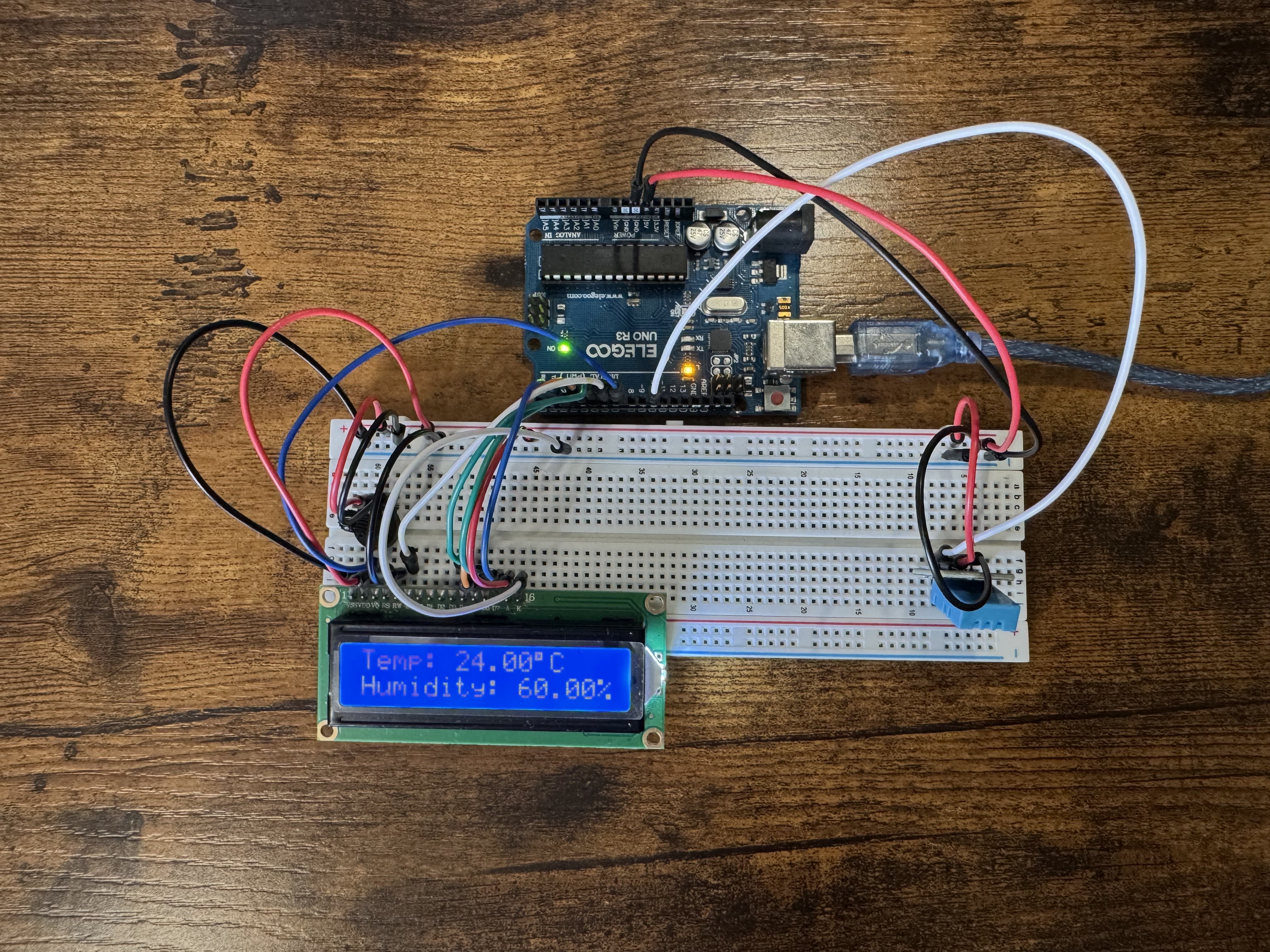
A simple room temperature and humidity monitor that uses the DHT11 sensor to measure environmental conditions and display live readings on an LCD1602 screen.
📸 Preview
⚙️ How It Works:
- The DHT11 sensor measures both temperature (in °C) and humidity (%).
- The Arduino reads the sensor data every second.
- The LCD1602 display shows the values across two rows.
- Row 1:
Temp: XX°C, Row 2:Humidity: XX% - It provides a live view of your room's climate.
📦 Components Used:
| Component | Purpose |
|---|---|
| Arduino UNO | Main controller |
| DHT11 Sensor | Measures temperature and humidity |
| LCD1602 (16-pin) | Displays live readings |
| 10k Potentiometer | Adjusts LCD contrast |
| Breadboard + jumper wires | Connections |
🔌 Wiring Instructions
🟦 DHT11 Sensor
| DHT11 Pin | Connect to Arduino |
|---|---|
| VCC | 5V |
| DATA | D10 |
| GND | GND |
🟩 LCD1602 (16-pin)
| LCD Pin | Label | Connect to Arduino |
|---|---|---|
| 1 | GND | GND |
| 2 | VCC | 5V |
| 3 | VO | Middle pin of 10k pot |
| 4 | RS | D7 |
| 5 | RW | GND |
| 6 | E | D6 |
| 11 | D4 | D5 |
| 12 | D5 | D4 |
| 13 | D6 | D3 |
| 14 | D7 | D2 |
| 15 | A | 5V |
| 16 | K | GND |
Potentiometer: One side → GND, Other side → 5V, Middle pin → LCD pin 3 (VO)
🧾 Arduino Code
    #include
    #include "dht_nonblocking.h"

    #define DHT_SENSOR_TYPE DHT_TYPE_11
    static const int DHT_SENSOR_PIN = 10;

    DHT_nonblocking dht_sensor(DHT_SENSOR_PIN, DHT_SENSOR_TYPE);

    // LCD: RS, E, D4, D5, D6, D7
    LiquidCrystal lcd(7, 6, 5, 4, 3, 2);

    void setup() {
    lcd.begin(16, 2);
    lcd.setCursor(0, 0);
    lcd.print("Temp & Humidity");
    delay(2000);
    lcd.clear();
    }

    void loop() {
    float temperature;
    float humidity;

    if (dht_sensor.measure(&temperature, &humidity)) {
        lcd.setCursor(0, 0);
        lcd.print("Temp: ");
        lcd.print(temperature);
        lcd.print((char)223);
        lcd.print("C   ");

        lcd.setCursor(0, 1);
        lcd.print("Humidity: ");
        lcd.print(humidity);
        lcd.print("%   ");
    }

    delay(1000);
    }
📦 Installing the Required Libraries
1️⃣ LiquidCrystal
This library comes pre-installed with Arduino IDE. No action needed.
2️⃣ DHT_nonblocking Library
- Open Arduino IDE
- Go to Sketch → Include Library → Manage Libraries…
- Search for DHT sensor library (non-blocking)
- Click Install
ZIP Install: Use Sketch → Include Library → Add .ZIP Library… if you downloaded the file manually.
🚀 Uploading the Code
- Open Arduino IDE
- Paste the code
- Select your Arduino UNO board and port
- Click Upload ↑